
7.7 KiB
Virtual Memory
collapsed:: true - Additional memory without adding physical RAM - simulates memory using storage devices - Useful when RAM is inusufficient - Hardware and Software implementations - Utilizes disk drive to store memory - ## Why Use Virtual Memory - Modern operating systems require a lot of memory - Not enough physical RAM to multiple apps - ## How Virtual Memory Works - Memory Management Unit (MMU) - Unneeded data in RAM moved to hard disk - Swap file or page file - Slower that RAM, although SSDs are better than hard disks - ## Managing Virtual Memory in Windows - Performance options -> Virtual Memory - ## Pros and Cons of Virtual Memory - | Pros | Cons| | Can improve system performance | Slower than physical RAM | | Increases capacity for multitasking | Consumes disk space | | Useful for large, memory-intensive applications | Can result in frequent hard disk access | | | Leads to poor performance if incorrectly used |
-
Small Outline Dual In-line Memory Module (SODIMM)
collapsed:: true- Refers to its smaller footprint
- Performs similarly to larger DIMMs
-
SODIMM Versions
- DDR
- DDR2
- DDR3
- DDR4
- DDR5
-
DDR5
- Released in 2020
- Maximum DIMM size of 128GB
- Lower voltage at 1.1V
- 51.2 GB/s
-
Double Data Rate 3 (DDR3) Memory
collapsed:: true- Twice the speed of DDR2
- 240-pin DIMM or 204 SODIMM
- Incompatible with previous generations
-
DDR3
- Bus clock speed between 400 and 1066 MHz
- Cycles four times per bus cycle
- Transfers data twice per clock cycle
- Bandwidth between 6400 and 17066 MB/s
- MT/s (Million transfers per second)
- e.g., DDR3-1600 - 1600 million transfers per second
-
Double Data Rate 4 (DDR4) Memory
- DIMM and SODIMM form factors
- Twice the speed of DDR3
-
DDR4
- 288-pin DIMM or 256-pin SODIMM
- Incompatible with previous generations
- Bus clock speed between 1066 and 2133 MHz
- Bandwidth between 12800 and 25600 MB/s
- MT/s from 1600 to 3200
-
Double Data Rate 5 (DDR5) Memory
- Lower Power consumption
- Twice the speed of DDR4
-
DDR5
- Lower voltage at 1.1V
- Voltage regulators
- Additional cost
- 51.2 GB/s
- MT/s from 3200 to 6400
-
DDR5 Enhancements
- Four times the capacity of DDR4
- Single DIMM maximum of 128 GB
- Die stacking
- LRDIMM up to 4 TB

-
Error Checking and Correcting (ECC) Memory
- Discover and correct single-bit memory errors
- More reliable than non-ECC memory
- Requires more processing power
-
ECC Memory
- Data Integrity vs. processing speed
- Sometimes it's better to slow things down
-
ECC Chip Comparison
-
ECC Error Correction
- Uses parity
- for every 8th bits written, 9th parity bit stored
- For each byte, total of 1s are summed up
- Value of parity bit compared to data
- If parity bit matches bit count, data assumed to be correct
- If parity bit value doesn't match, data assumed to be corrupt
- Error correcting memory will attempt repair
- Limited to single bit errors in a byte
- Less common in modern systems
- ECC memory considered reliable
- Modern technology negates need
-
-
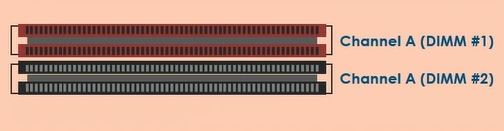
Single Channel Memory Mode
- Data flow between CPU and RAM (memory bus)
- 64-bit memory bus or channel
- if one channel and two chips, channel is shared
-
Bus Pathways
- Data
- Control
- Address
-
Single Channel RAM
- Chips must share single channel
- Memory addressed separately
-
Dual Channel Memory Mode
- Two dedicated 64-bit buses
- if two physical chips, each has own channel
- if four chips, they operate in pairs

-
Two Chips
- Channel A and B
- Improved Performance
-
Four Chips
- Four chips still benefit
- Two chips sharing each channel
- Still better performance
-
Memory Addressing
- No conflicts
- Simultaneous operations
- Improved performance with multitasking
-
Triple Channel Memory Mode
- Three separate 64-bit buses
- if three chips, each has own channel
- If six chips, they operate in pairs

-
Bus width
- 192 bits
- Wider pathway
- Simultaneous access
- Dedicated chips in dedicated channels
-
Triple Channel Memory
- Chips vs. slots
- Consider leaving one channel empty when using 4 chips
-
Quad Channel Memory Mode
- Four channels
- Supports four memory modules in dedicated channels
-
Quad Channel Memory
- All four modules required for full functionality
- Same capacity and speed
- When two modules installed, will operate in dual channel mode
- When three modules installed, will operate in triple channel mode
-
Quad Channel RAM
- Relies on number of installed modules
- Depends on system specifications
- Number of modules will determine channels
-
Pros and Cons of Quad Channel RAM
- | Pros | Cons | | Improved system performance | Costly| |Four times memory bandwidth as single channel | | | Higher capacity | |
-
Hard Drive Storage Devices
- Electromechanical data storage
- Rapidly rotating magnetic platter
- Actuator arm reads and writes data
- Data is randomly accessed
- Non-volatile storage
-
Key Characteristics of HDDs
- Mature Technology
- Highly Reliable
- Cost effective
- High capacity
- Serial ATA Interface
-
HDD Performance
- Platter rotation speed (5400, 7200, 10,000, 15,000 RPM)
- Internal cache
- Interface Type
-
HDD vs. Solid-State Drive (SSD)
- HDD underperforms SSD
- HDD has larger capacity than SSD
-
3.5 Inch HDD
- Common in desktop systems
- Easy to install
- Cost-effective
- Increased capacity
- Available interface
-
2.5 Inch HDD
- Common in laptops
- Can be used in desktops
- Lower capacity
- Slower data transfer rates
- Less heat and noise
-
Hybrid Drives
- SSD speed
- HDD capacity
- Cost
-
Solid-state Drive (SSD) Solutions
- Non-volatile storage
- No moving parts
- Increased performance
-
Solid-state Drives (SSD)
- Less prone to wear and tear associated with HDD
- More durable over time
-
Improved Performance
- Reading and writing data
- Shorter boot times
- Faster application launching
- Faster file transfer
-
Advantages of SSDs
- No defragmentation required
- Quiet operation
- More compact that HDDs
- Lower power requirements
-
Disadvantages of SSDs
- Costly
- Lower capacity
- Little warning of impending failure
- Shorter lifecycle than HDD
- Not suitable for archiving
-
SSD Communication Interfaces
- Non-volatile memory express (NVMe)
- Peripheral component interconnect express (PCIe)
- Serial advanced technology attachment (SATA)
-
SSD Form Factors
- mSATA
- M.2
-
Redundant Drive Configurations
- Redundant Array of independent Disks
- Redundant and non-redundant
- Reliable data storage
- Low cost
- Common in network servers
-
RAID Categories
-
Software-based RAID
- Uses OS based software to setup and manage the RAID
-
Hardware-based RAID
- Physical RAID controller card manages RAID
-
-
RAID 0 - Striping

- No redundancy
- Implemented for performance
-
RAID 1 - Mirroring
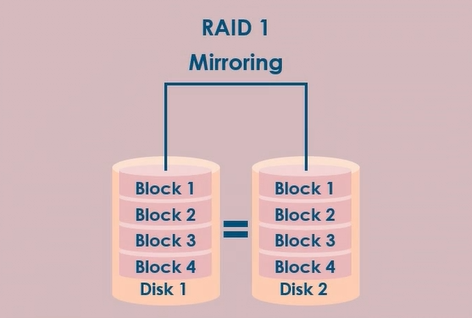
- Implements redundancy
- Implemented for redundancy
- Only configured on 2 disks
-
RAID 5 - Striping with Parity

- At least 3 disks required up to 32


